OlmoEarth Documentation
OlmoEarth is a state-of-the-art Earth observation foundation model paired with a no-code platform that makes developing and deploying high-performance fine-tuned models far more accessible.
The OlmoEarth platform makes model fine-tuning simple through a guided interface for configuring model training and generating outputs. You can iterate on model configurations and use the integrated annotation tool to help guide model performance to where it matters most. The platform also handles many practical challenges, including accessing and preparing Earth observation data for model training and inference.
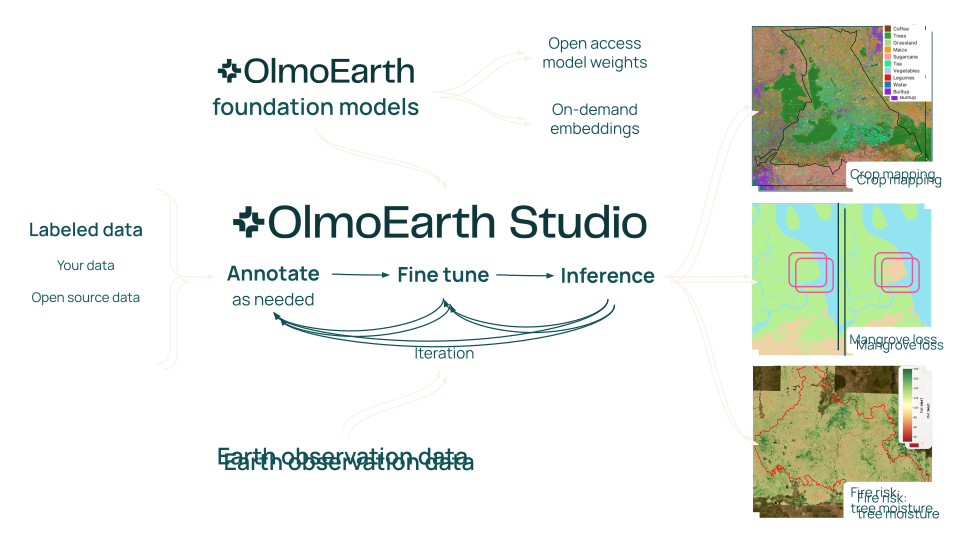
In addition, OlmoEarth supports generating embeddings for monthly and longer time periods for use within your existing machine learning workflow. And with the open-access model, you have the flexibility to deploy it in your own environment.
The OlmoEarth model itself is trained on a globally distributed dataset of Earth observation data with strong spatial distribution and observations throughout the year, enabling it to learn both spatial patterns and temporal dynamics.
What You'll Find Here
This documentation covers two main areas:
OlmoEarth API - Create datasets, run fine-tuned models, and retrieve predictions programmatically. All endpoints are documented in the Interactive OlmoEarth API Browser, where you can test requests and generate code samples.
OlmoEarth Studio - An end-to-end platform for building models: import or annotate training data, fine-tune and deploy models, and visualize or export outputs.
Getting Started
If you're new to OlmoEarth:
- Check out some of the projects that have been built with OlmoEarth
- For guidance on platform capabilities and requirements, as well as model training data considerations, check out the OlmoEarth Studio section
- Review the Glossary to understand core concepts
- Get your API token by following the Authentication guide