Model Fine Tuning
This section includes
- What the OlmoEarth model can do
- The satellite data used by the model
- The labeled data required for model training
- Model fine-tuning configuration options
- Considerations for model iteration
Supported task types
- Per-pixel classification (segmentation) - Predict a class label for every pixel (e.g., land use, land cover, crops)
- Per-pixel regression - Predict a numeric value for every pixel (e.g., tree height; soil moisture)
- Window-level regression - Predict a numeric value for a window/scene (e.g., biomass)
- Window-level classification - Predict one class for a window/scene (e.g., presence of river)
- Object detection - Detect and classify objects (e.g., solar arrays; oil slicks)
- Change detection (forthcoming) - Detect changes/anomalies (e.g., mangrove loss)
Model Input Data (Modalities)
OlmoEarth uses the following input modalities alongside labeled data for fine-tuning and inference. A satellite's resolution and revisit rate directly impact what can be detected and how often outputs can be updated.
The current satellite modalities used by OlmoEarth have similar geographic coverage — most terrestrial locations and variable ocean coverage, up to about 300km from the coast.
| Sentinel-1 | Sentinel-2 | Landsat 8/9 | |
|---|---|---|---|
| Sensor type | Radar (SAR), C-band | Optical multispectral | Optical multispectral + thermal |
| Bands / Modes | VV, VH modes | All bands | All bands |
| Spatial resolution | 10m grid (~20m effective) | 10m | 30m |
| Revisit rate | 6-12 days | ~5 days | ~8 days |
| Available since | April 2014 | July 2015 | May 2013 |
This is a simplified overview. In practice, each dataset includes multiple bands with different native resolutions that are grouped and harmonized. For full details, see the OlmoEarth technical paper and dataset documentation.
These satellites operate in sun-synchronous polar orbits and therefore collect data less frequently near the equator, more frequently near the poles.
Each satellite is part of a constellation. Throughout history, some satellites have stopped gathering data as new ones have been added to the constellation. This impacts the geographic coverage and revisit rates.
Labeled Data Requirements
Fine-tuning requires labeled data that links a location, a time, and a target variable. These labels are used alongside the Model input data (e.g., Sentinel-2 imagery) to teach the model what patterns correspond to the phenomenon you want to detect or predict.
OlmoEarth supports two general types of labeled data:
- Direct geometry-level annotations — labels tied to specific points or polygons
- Area-aggregated labels — labels that summarize values over larger areas such as administrative units or grid cells
The type of labels used will influence which prediction tasks are most appropriate.
Supported data formats
Training data can be points or polygons.
CSV - points GeoJSON - points or polygons
- Polygons can be expressed as FeatureCollection or Features
- Polygons include multipolygons.
Coordinates must be WGS84 latitude/longitude (decimal degrees).
Required data fields
Location - Latitude and longitude. For .csv files, the fields/columns must be separate. Time - A single observation date (e.g., the date of a field observation) or a date range representing the period the label applies to (e.g., aggregated measurement period) Model training data - The data used to fine-tune your model.
- Category - A set of nouns (e.g., buildings, water, trees)
- Number - Measurement values (e.g., moisture content values)
- True or False - Boolean statements
Direct geometry-level annotations
These labels are of a specific thing or measurement at a specific location:
- Points from field observations
- Polygons outlining land cover or infrastructure
- Hand-drawn polygon annotations on imagery
These labels are typically used for per-pixel classification and regression, as well as for object detection.
Area-aggregated labels
Area-aggregated labels summarize spatial units rather than specific features. These may include:
- Administrative units (e.g., districts or counties)
- Grid cells
- Statistical reporting areas
Area-aggregated labels provide summary values for a region and therefore typically support window-level classification or regression tasks rather than pixel-level predictions.
Fine-tuning Configuration
The OlmoEarth platform includes a step-through fine-tuning configuration guide. A good way to start is to think about what information would be useful to you in order to identify a feature or phenomenon.
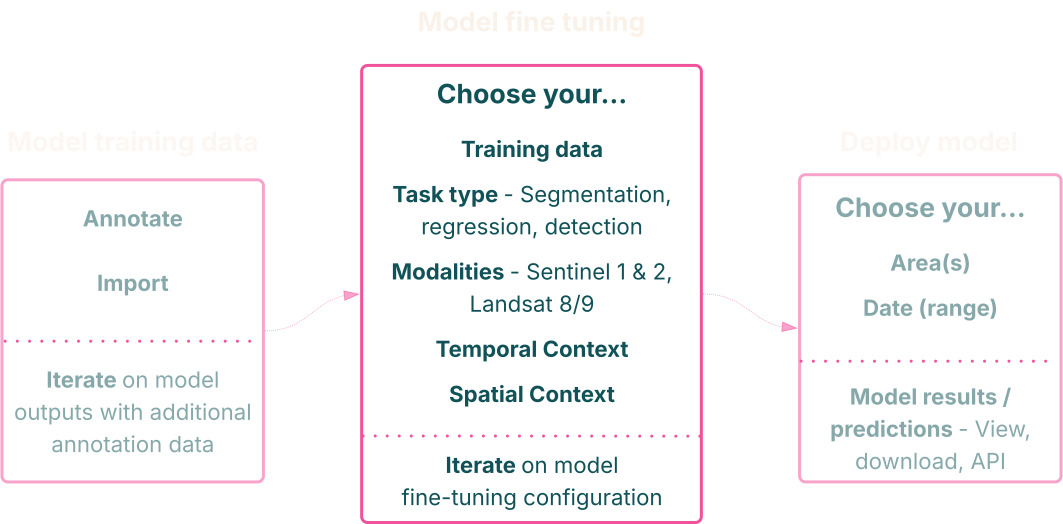
The model fine-tuning configuration includes selecting the data field from your dataset to train the model, the task type, the modalities, and the temporal and spatial context described below.
Temporal context
Temporal context is the amount of time the model considers when learning from labeled and input data. The fine-tuning configuration guide allows time to be used in three ways:
- A precise time at which an observation occurred (e.g., time and location of a vessel observed in a Sentinel-2 image)
- A relative window before and after (e.g., 3 months before and 3 months after a specific observation)
- The general window relevant to the year (and month) of the data (e.g., a growing season such as April–October)
Spatial context
Spatial context is the area surrounding the labeled data that the model uses to inform its predictions. The model receives this larger area as input when generating predictions for a smaller prediction window.
Considerations for model configuration and data
Model development is iterative and often requires experimentation. This section provides additional guidance on configuring and preparing your model training data.
Experimentation and Iteration
A reasonable fine-tuning configuration may perform poorly while another configuration may yield surprisingly good results. It is best to try at least a few configurations to see how the model performs.
Training data
As a model is applied, it will almost certainly encounter patterns not represented in the training data, leading to misclassifications.
In the OlmoEarth platform, confirming or correcting predictions with additional annotations can help reduce false positives. Sourcing additional high-quality labeled data can also help address shortcomings.
Modalities
More modalities (Optical/Multispectral + Radar) is not always better. Unnecessary modalities can introduce unwanted noise and increase the time and cost of building or deploying models. We generally recommend most folks to start with only Sentinel-2 and then experiment from there.
Temporal context
Start by choosing a date range that captures the most informative period or the phenomenon's validity.
For example, identifying a tree species may involve a temporal context spanning budding through leaf fall. It may also be worth testing a full annual cycle to see if a broader temporal context improves performance. A larger time frame can be helpful, but it can also introduce confusion (e.g., mapping lakes in seasonally flooded areas).
Spatial context
Think about what would be helpful if you were visually inspecting a scene. Consider how much of the surrounding area is useful for interpretation.
For example, the goal may be to identify a set of 10m × 10m patches as "beach" or "not beach." You need to see a larger area than 10m × 10m to determine whether the sand is near water (a beach) or part of a desert. However, too much spatial context can cause the model to learn patterns specific to your dataset that are unrelated to the target (e.g., beach vs. non-beach). This is especially true for smaller datasets that offer limited diversity for the model to learn from.
OlmoEarth will guide you toward a reasonable spatial context based on your dataset, but experimentation can sometimes produce welcome surprises.